Why VS Code Insiders Feels Worth It Again
My take on recent VS Code Insiders and agent workflow updates, based on public sources, with a few reasons to keep Stable installed too.
Based on public sources. Any opinions here are my own and do not represent my employer.
I have been using VS Code long enough that I stopped thinking about Insiders. That was a mistake.
The Let It Cook episode from February 27, 2026 was a good reminder that the most interesting VS Code work still tends to show up there first. Stable VS Code is where I work. Insiders is where I now want to watch what is about to matter.
The low-risk reason to install it
The basic case for trying Insiders is much less dramatic than people assume.
What installing Insiders actually changes
The risk is lower than most people expect because the official setup keeps Insiders fast-moving without forcing Stable to move with it. That is still not the same as risk-free.
How often does it move?
VS Code Insiders is updated daily, while the public VS Code release notes archive keeps the Stable train on a monthly rhythm.
Can I keep Stable installed?
Yes. The docs explicitly say VS Code and VS Code Insiders can be used side by side.
Will it trash my setup?
Not by default. Insiders stores user data and extensions in separate locations.
Install and use it at your own discretion. Proprietary software, extensions, and open-source dependencies all carry some operational and security risk, so this is a workflow judgment rather than a blanket recommendation.
That last point matters most. If Insiders regresses, Stable does not have to come down with it.
What stood out around the February 27 stream
The strongest theme was not "AI everywhere". It was better context for agent workflows, and better tooling for inspecting what the agent is actually doing.
1. Browser tools are becoming real agent context
The February 2026 VS Code release notes quietly describe something very useful: browser tools in Agent mode can now pull in network request failures and console logs, not just screenshots. They also added Add element to chat, which lets you target a DOM element and send that selection into chat with a screenshot attached. Under the hood, those browser sessions now use Playwright.
That is a much better story than "paste a screenshot and hope". If the agent can see the broken element, the screenshot, the console output, and the failed requests in one loop, the debugging loop gets shorter.
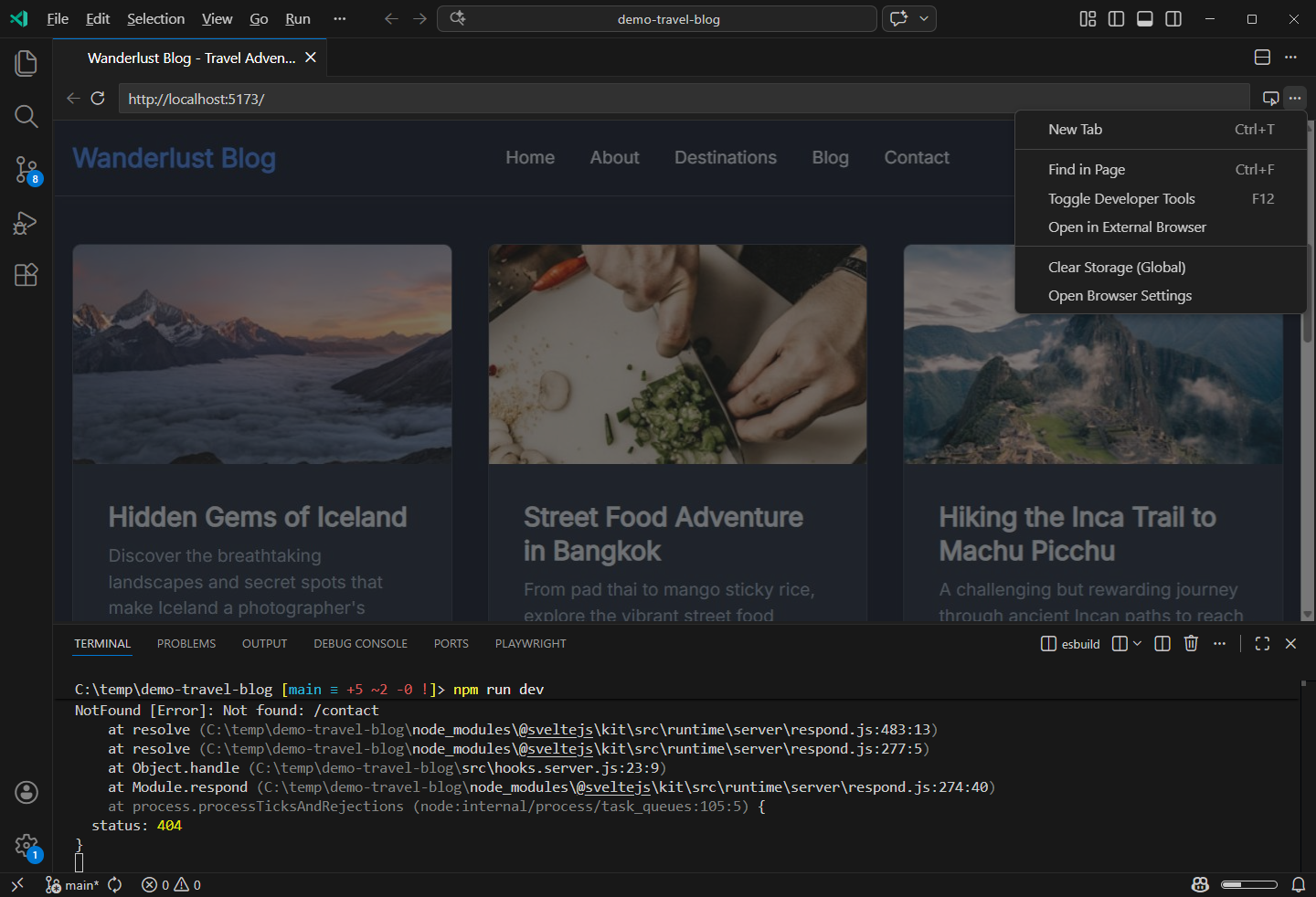
The Integrated Browser workflow that now feeds richer browser context into agent tasks. Source: VS Code browser debugging docs.
For anyone building UI-heavy apps, this is the first VS Code agent feature in a while that feels immediately practical. It is not replacing Playwright or manual debugging. It is reducing the time spent reconstructing browser context for the model.
2. Agent sessions and debugger tooling are the real maturity signal
Another good sign is that VS Code is adding more structure around agent work itself.
The February 2026 release notes added Agent Sessions, which let you branch off a new task, return to previous work, and keep context organized. Then the February 2026 Insiders notes added an Agent Debugger and Instructions Diagnostics. The public Chat Debug View docs point in the same direction: prompt customization is only useful if you can inspect the instructions, context, and tool calls that shaped the result.
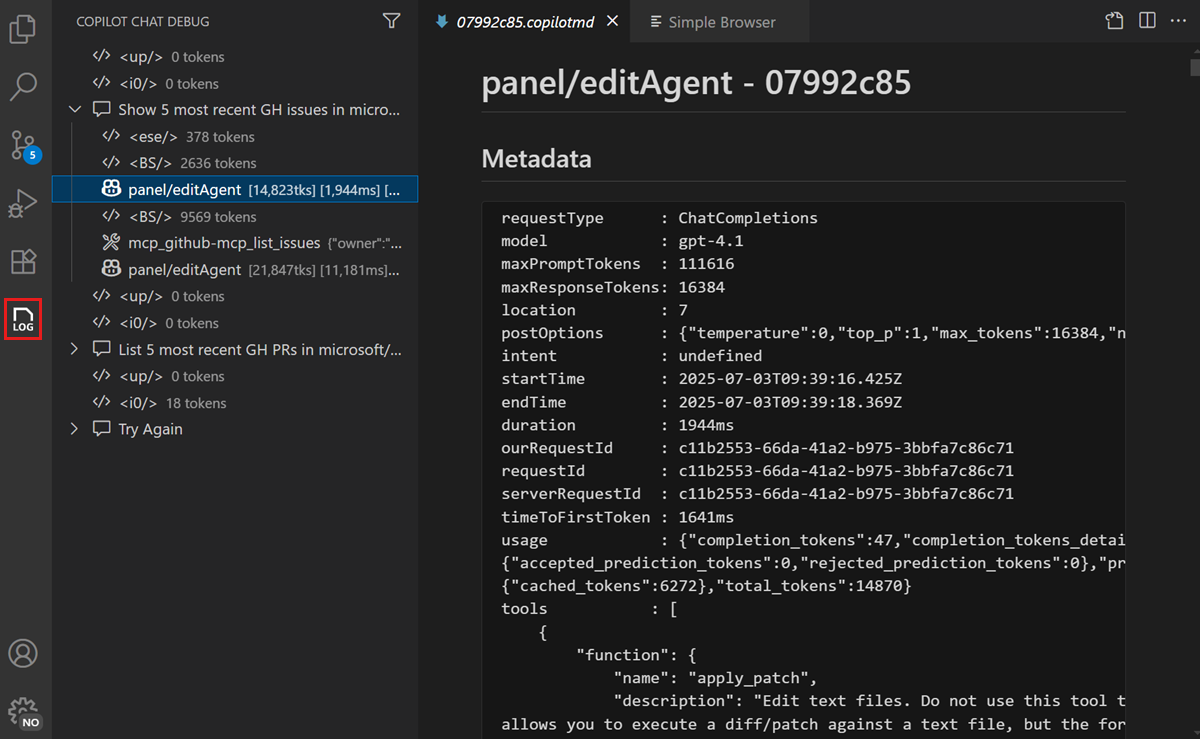
The public Chat Debug View, which makes the agent execution path inspectable instead of opaque. Source: VS Code Chat Debug View docs.
This is the part that makes the whole stack feel more engineering-led and less vibes-led.
3. "Agent plugins" makes more sense if you read it as tools plus instructions
One line from the stream that stuck with me was Pierce Bogan talking about "agent plugins". The current public VS Code wording is a bit different, but the direction is clear.
The Agent mode docs frame this as a system of model-selected tools, including tools exposed by MCP servers. The February release notes also expanded how agent tools show up in profiles and how browser tools feed structured context into chat. So while the stream language was informal, the product direction is not hard to read: agent workflows in VS Code are becoming more composable.
4. agentrc is the most interesting "scientific" piece of the whole stack
The project that made me stop and pay attention was microsoft/agentrc.
The README describes it as a CLI that helps you define tasks, datasets, evaluators, and benchmarks so you can measure the impact of agent changes instead of guessing. That is exactly the right instinct. If you are changing instructions, tools, or model behavior, you should be able to test whether the change actually helped.
agentrc init
agentrc run
agentrc statusTo me, this is the most promising part of the recent VS Code and agent ecosystem work. It moves instruction tweaking away from superstition and toward evaluation.
My practical take
If you do a lot of product engineering work, especially front-end or full-stack debugging, Insiders now looks worth keeping installed for three reasons:
- Stable remains your safe lane, because Insiders is isolated and side-by-side.
- The browser tooling is getting much better at bundling the exact context agents usually miss.
- The debugging and evaluation story is improving, which is what separates a toy workflow from a reliable one.
I would still keep a little skepticism in place. Insiders is supposed to move fast, and regressions are part of the deal. But the February 2026 mix of browser tools, agent sessions, debugger support, and agentrc made it feel like VS Code is getting more serious about the whole agent loop.
One lightly sourced extra
I could not find a public docs page for chat.agent.thinking.phrases, so treat this as a stream note rather than a formal recommendation. It is fun, but it is not the reason to install Insiders.
{
  "chat.agent.thinking.phrases": {
    "mode": "replace",
    "phrases": [
      "Have you tried turning it off and on again?",
      "Checking whether it's supposed to do that.",
      "Consulting the logs with appropriate suspicion.",
      "Putting this over here with the rest of the context."
    ]
  }
}Sources
Related entries
The Loop Is the Product
Ralph loops, VS Code Autopilot, Chief, and Lisa all point at the same thing: the useful part is persistence, not the prompt.